
Your background music, mixed for you
Add your own songs, put them in order and press play. Your music stays on this device: nothing is uploaded.
1 Add your music
Drop music files here, or choose them from your phone, tablet or laptop.
MP3, M4A, AAC and WAV play on almost every device. Songs from streaming apps such as Spotify or Apple Music can’t be added, because those apps lock their songs inside the app.
2 Put them in order
No songs yet. Add your music files, or try the demo tunes to see how it works.
3 Settings
Music licence: playing recorded music in public at a business, such as a pub, shop, hall or venue, needs a music licence (TheMusicLicence from PPL PRS). Most venues already hold one, so check with yours. A private party in your own home doesn’t need one.
Planning an event?
Background music sorted. Now for the party
When it’s time to fill the dance floor, Tinsel Tim takes over, live, reading the room. Weddings and parties across Norfolk, Suffolk, Cambridgeshire and Lincolnshire.
Rather talk it through? Call Tim on 07796 565918 or 01760 722283, or message him on WhatsApp.
Rated 4.9 out of 5 from more than 250 reviews · Norfolk’s Only Trading Standards Approved DJ
Save, share or send
Enter your details once for every tool. They’re kept only in your browser.
Share this free tool
Keep a copy
Is Tim free on your date?
Tim plays every booking himself, so dates go quickly. Pick your date and he’ll check his diary and reply.
Next stepYour DJ song list
Quick guide
How to use the background music player
- Add your music files, or try the 3 demo tunes.
- Put the songs in order, or shuffle them.
- Choose how the songs blend and when the music should stop.
- Connect your phone or laptop to the PA or speaker and press Play.
What it does
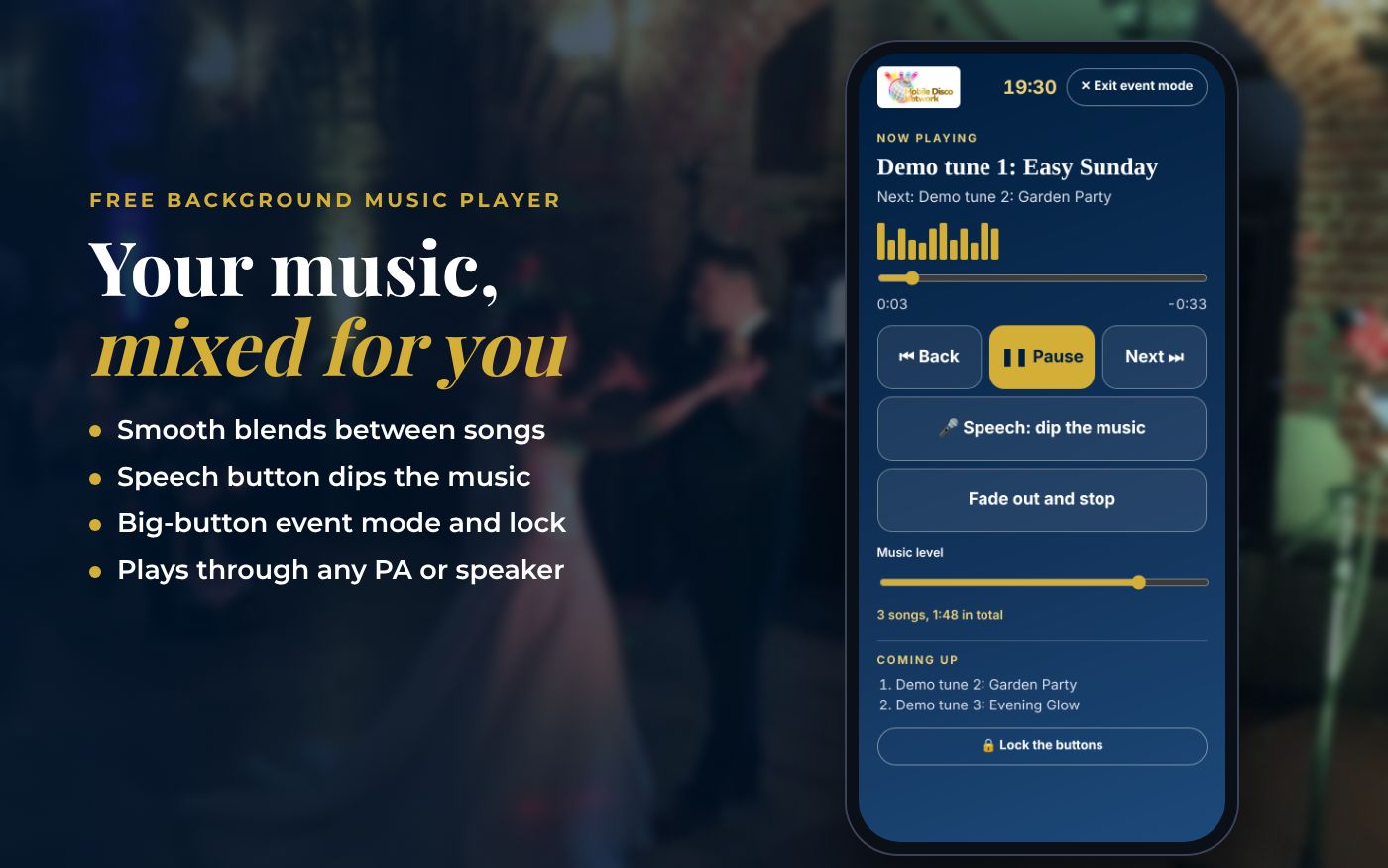
- Smooth blends between songs, or a short gap
- Speech button that dips the music and brings it back gently
- Evens out loud and quiet songs
- Stops after a set time or at a set clock time, with a fade
- Keeps the screen awake and works with lock-screen controls
- Your music stays on your device: nothing is uploaded
- Save or copy the track list
Use it with
- DJ Song List – put your must-play songs, do-not-play list and key moments such as the first dance and last song on one sheet for your DJ, with song search and previews
- Dance Floor Planner – plan your evening and see where the dance floor will dip. Get simple tips to keep it full
- Speech Timer – paste a wedding speech to see its word count and estimated speaking time, then plan the order of speeches against your party start time
- Wedding Day Timeline Builder – enter your ceremony start time and get a running order for the whole wedding day, from drinks reception to last song, with editable timings
Questions
Background Music Player: common questions
Can I use songs from Spotify or Apple Music?
No. Streaming apps lock their songs inside the app, so other pages can't play them. Use music files you own, such as MP3 or M4A files.
Are my music files uploaded anywhere?
No. The songs are played straight from your phone, tablet or laptop. Nothing is sent to Mobile Disco Network or anyone else.
How do I play it through a PA system?
Use a headphone-to-twin-phono (RCA) lead into a spare input on the PA mixer, or pair with a Bluetooth speaker. Start with the PA turned down, then bring it up.
Do I need a music licence?
Playing recorded music in public at a business, such as a pub, shop, hall or venue, needs TheMusicLicence from PPL PRS. Most venues already hold one, so check with yours. A private party in your own home doesn't need one.
Will the music stop if my phone goes to sleep?
The player asks the screen to stay awake while the music plays. Keep this page open and the device on charge for long events.
Tim’s tip
Background music should sit under the conversation, not over it. Set the level so people can chat without raising their voices, then let your DJ bring the energy up when it's time to dance.
Made by Tim Daymond (Tinsel Tim). Tim has been a DJ since 1976 and has run Mobile Disco Network since 2013. He plays weddings and parties across Norfolk, Suffolk, Cambridgeshire and Lincolnshire. He is a Norfolk County Council Trading Standards Trusted Trader (ID 0000457), a member of the NADJ and the winner of 23 independent awards.
Why choose Tim · Awards · Reviews
Your privacy: this tool runs in your browser. Nothing you type is sent to Mobile Disco Network or stored on a server. Your work is saved in this browser only, so it is there when you come back; clearing your browser data removes it.
Free to use, no sign-up. Last reviewed 11 October 2026.
Did this help?
Leave Tim a review
If this tool helped with your celebration planning, we’d love a quick review — whether you’ve booked Tim or not. It helps him keep this toolbox free and build more tools like it.
Leave a review →Planning an event? Check Tinsel Tim is free on your date. Check your date → WhatsApp Tim